.svg)
Choosing an incentive compensation management (ICM) software is a high-stakes decision:
- A decent ICM will save you time on calculating commissions and finally get you out of spreadsheets.
- The wrong choice will leave you stuck with brittle calculation engines, expensive manual workarounds, and frustrated teams.
- But a great ICM will significantly reduce overage expenses, minimize dispute cycles, boost retention, and give you the tools to update and adjust your commission plan yourself.
You know that your time, your resources, and your team’s morale are at stake. We wrote this guide for people like you, who want to approach this decision carefully and intentionally.
We’ll walk you through how to structure your buying process, what to look for from an ICM vendor, and the critical factors that separate today’s leading ICM solutions.
How we define “incentive compensation management software”
In this guide, “ICM” means “technology used to design, calculate, and administer variable pay for revenue teams.” From our perspective, “commission tracking software,” “sales compensation software,” and the like all fall into the ICM category. To us, in order for software to be considered an ICM, it needs to perform four core capabilities:
- Organizing and managing all commission-related data from your CRM, ERP, payroll tools, etc.
- Managing incentive plans and calculating payouts at scale
- Providing transparent reports on both performance and payouts for leadership and sales reps
- Automating incentive comp-related workflows like calculations, approvals, and disputes
ICM software replaces spreadsheet-heavy, manual workflows with a single source of truth for plans, performance, and payments. Organizations usually seek a new ICM to pay teams correctly, build trust, and give leaders clear visibility into results. (Or they’re just sick of their enormous commissions spreadsheet breaking.)
Why your Incentive Compensation Management (ICM) software choice matters
The ICM market is crowded, and more options crop up every year. But when you look closer, many fall short where it matters most. As Performio CEO Grayson Morris points out, today’s solutions often struggle with three critical challenges:
-

Balancing ease of use with flexibility
ICM buyers often face an impossible choice between platforms that are intuitive yet too limiting, and those that allow for complexity at the cost of usability.
-

Handling complex use cases
Most systems rely on formulas or rules that quickly become unmanageable as plans grow more sophisticated.
-

Putting customers in control
Too many tools force admins to depend on vendor support for routine changes, slowing teams down and driving up costs.
Instead of tackling these problems directly, many vendors have turned their attention to less critical add-ons, leaving room for improvement in the areas that actually matter.
This is further complicated by AI. You’ve probably noticed that now everyone in ICM is eager to tell you about their AI capabilities. But this can muddy the waters. If an ICM has a sturdy infrastructure, AI compounds its value. But a wonky ICM with an AI chatbot just makes the wonkiness faster and friendlier.
Your choice of ICM software will shape not only how commissions are managed today, but also how well your organization can adapt to new plans, structures, and business priorities in the years ahead. It’s a decision that demands clear-eyed evaluation and careful comparison.
How to use this ICM Buyer’s Guide and decision framework
We created this guide to be useful no matter where you are in the ICM buying process, but not every reader will need every section of this ICM decision-making guide.
If you’re starting the process from scratch, begin with part one, “How to design your ICM software selection process.” This section walks you through assembling the right team, building a decision framework, conducting initial research, and sending a request for proposal (RFP).
If you already have a shortlist of ICM vendors and are ready to narrow it down further, head to part two, “How to compare ICM solutions.” Here, we’ll show you how to create objective evaluation criteria and score vendors consistently.
And if you want to dig into the details, skip ahead to “12 critical factors to consider when buying an ICM solution.” This is where we take an in-depth look at the factors that matter most and show how leading ICM vendors compare (including how to assess their AI maturity).
Finally, if you really, really want to get into a technical explanation of our own grading rubric, the appendix will walk you through our precise scoring methodology.
Part one: How to design your ICM software selection and decision-making process
Finding the right ICM solution starts with having the right process. We’ve worked with hundreds of sales organizations across industries, and the best-prepared buyers build a decision framework to keep their teams aligned and focused on the factors that matter most.
Build the decision team
Choosing an ICM software solution is a significant financial commitment, and it affects a wide range of roles across your organization. So it isn’t a decision that should be made by a single individual. Ideally, you should assemble a cross-functional team to evaluate options and make the decision collaboratively. This team can be broadly divided into two key groups: gatekeepers and additional stakeholders.
Gatekeepers are the ultimate decision makers. They have the authority to make the final call, approving or rejecting your proposed choice for an ICM solution. So it’s essential to understand their criteria early. Without their buy-in, even the most carefully chosen platform could be blocked at the final step.
The most common gatekeeper will be the Chief Financial Officer (CFO), who typically controls the budget and has to ensure a good ROI for the ICM solution. In cases when the decision doesn’t fall to the CFO, final approval typically shifts to whichever executive owns the compensation budget or revenue mandate. It’ll be important for you to identify who that is in your organization and to keep their priorities at the forefront of your selection process.
Additional stakeholders may not have formal decision-making power, but since they’ll be using the ICM solution regularly, you want to make sure it will work well for their needs. Including them in the process shows respect for their needs and helps avoid future conflicts if the ICM solution doesn’t live up to their expectations. Typical stakeholders to consult include:
-

Sales operations
Frequently initiates the search, evaluates how well the platform automates daily commission calculations and solves pain points, and takes ownership post-implementation.
-

Finance, accounting, or HR
Often manages commissions and may encourage the evaluation due to payout issues, focusing on financial justification and operational efficiency.
-

IT & business analysts
Become involved during technical proof and scoping stages to ensure the system can handle specific data and integration requirements.
-

Sales leadership
Adds context to ensure alignment with sales operations, and provides a high-level thumbs-up.
Determine the buying process
Before you start evaluating vendors, lay out a specific plan for how you’ll make the decision. This ensures everyone involved is working toward the same goal and comparing options against consistent criteria.
First, clarify your desired outcomes. Ask your decision team questions like:
- What problems must the ICM solution solve from day one?
- What inefficiencies or risks do we want to eliminate?
- What new capabilities should it enable?
Depending on your organization’s needs, priorities could include things like eliminating commission errors, reducing audit risks, improving visibility for sales reps, speeding up monthly payout cycles, or replacing a system that can’t keep up with plan complexity. Whatever your specific goals, document them to use as benchmarks for evaluating ICM solutions.
Next, set your desired timeframes. This includes both the time to make the decision (how long you plan to spend on research, comparisons, and demos) and the time to complete onboarding and implementation (when you need the system to go live).
Treat these as ranges of acceptable timelines rather than a single rigid deadline, and approach them with realistic expectations. Selecting and implementing an ICM solution tends to be a long process—months to years, not weeks. Ask vendors for examples of similar projects they’ve completed to verify their claims—and be wary of vendors who promise unusually brief implementation periods.
Finally, outline your decision criteria. Translate your desired outcomes into a specific rubric you can use to compare and evaluate the ICM solutions under consideration.
In part two of this guide, we’ll elaborate on the decision criteria, covering the 12 factors we see as most impactful for every organization.
Conduct product research
Once you’ve outlined your decision criteria and established a rubric for evaluations, it’s time to research ICM solutions and create a shortlist of options that will, at least on paper, meet all of your needs. This means looking to a variety of sources to collect information.
Narrow your shortlist
It’s very, very easy to generate a list of ICM providers. In a vibe-coded world, it’s not that hard to spin up a simple commission calculator. Whether you start your search with ChatGPT, Google, or another tool, you’ll get a lot of options right off the bat. If you’re managing sales compensation at the enterprise level, make sure you don’t lose the serious players in the noise.
The tried-and-true independent ICM players are Performio (founded in 2006), Varicent (2005), CaptivateIQ (2017), and Xactly (2005). These software companies have been serving enterprises for a long time, and they’ve got the big-logo customers to show for it. Spiff (2017, acquired by Salesforce in 2024) is also a popular contender, as is Everstage (2020). There are other options out there, but a serious search should include these names.
Gather information
The first and most obvious place to look is each vendor’s own website. Here you should be able to identify the basic feature sets a given ICM solution advertises, and if they don’t offer what you need, you can move on. But keep in mind that every claim on a vendor’s website is self-reported. So you should attempt to verify what they say with unbiased reviews and reports.
Community discussions in places like Reddit, LinkedIn Groups, and industry forums can be invaluable sources of information, giving you a front-row seat into real user experiences, including both the benefits and pain points others have experienced with different ICM tools. And if possible, reach out to industry peers for conversations about the solutions they’ve used. That first-hand user feedback can give you an even more granular perspective, allowing you to ask detailed questions about how a given tool handles your specific criteria.
Third-party industry reports can also help you understand the playing field of options available, offering professional reviews of each solution that highlight their strengths and weaknesses. For example, the Forrester Wave SPM/ICM report is a highly regarded annual examination of how various incentive compensation management tools perform. But pay close attention to when these reports were published! ICM is a competitive space, and vendors add and improve capabilities rapidly.
Finally, be wary of “best of” lists. Try to identify what source they’re coming from and how they were compiled. These days, many such articles are AI-generated lists with cursory descriptions of products. These paraphrase vendor websites, G2 reviews, and other online sources—sometimes with limited human fact-checking. If anyone is ranking software providers, check for a detailed methodology that outlines exactly how they came to the conclusions they did. (We aimed to be both fair and transparent when we published our own list.)
Using the information gathered from all of these sources, and comparing it against your decision criteria, narrow the field down to a handful of viable options. A manageable shortlist is usually around three to five vendors. Too many, and you risk bogging down the process and overwhelming your decision team. Too few, and you could miss out on a strong contender.
The goal of the shortlist is to make sure you’re using your time wisely by evaluating only the solutions that are most likely to meet your needs.
Send a request for proposal (RFP)
After identifying your shortlist, the next step is to send a request for proposal (RFP) to each of those vendors. The RFP should outline your requirements, ask targeted questions, and obtain pricing information. Ideally, the responses to your RFPs will allow you to evaluate each ICM solution side by side.
Once potential vendors have signed an NDA, give them the context they need to understand your business and respond meaningfully. Include details like:
- Your current commission process: tools, data sources, team size, and pain points
- Project objectives: the problems you’re solving and the outcomes you expect from a new ICM solution
- Plan complexity: the number of components, types of payees, crediting rules, and payout mechanics
- Core functionality requirements: a list of any requirements that are essential to your business needs
From there, ask vendors specific questions about their ICM platforms like:
How does the system handle data integrations? Can it ingest our data in its raw format, or will we need to process it first?
Incentive compensation relies on data from many different systems, often in a wide range of formats. If you have to pre-process it all before importing, you’ll waste significant time and money while increasing the risk of errors. Ideally, your ICM solution should handle that processing for you, enabling seamless and reliable data intake.
Does it include out-of-the-box functionality for our core requirements, or will that have to be custom-built?
Every organization’s compensation plans are unique, with their own rules, exceptions, and payee types. If an ICM solution can’t support your requirements out of the box, you’ll end up paying for custom builds and relying on vendor support for every change. Look for a platform with flexible components that let you configure plans yourself without sacrificing complexity.
What data can the vendor’s AI reference and interpret?
Almost every ICM vendor will be quick to tell you they’re using AI. You need to know more. Ask them to show you how their AI system can reference and interpret its own ICM product data, your commission plan, and the commissions and deal data in your ERP, CRM, payroll tools, etc. Ask for specific examples of how their AI expedites plan generation, plan modeling, data processing, and plan analysis.
Will implementation be handled by the vendor or by a third-party partner?
It's important to know who’s actually doing the work of implementation. Some vendors use their own teams, while others rely on third-party partners—but the worst pull a bait-and-switch, hiding the handoff until after you’ve signed. Vendors should be upfront about whether implementation is in-house or partner-led, and what that means for your ongoing support.
What’s the expected timeline for implementation? Can you provide examples of similar projects?
You want to avoid an overly long implementation process that delays your ROI. However, vendors that promise unrealistically short timelines can throw off your planning and set you up for disappointment. The best vendors will provide a realistic range based on the size and complexity of your comp program, backed by examples of similar projects they’ve successfully delivered.
What does the vendor’s ongoing support program look like?
Even the best ICM platforms need strong customer support when issues arise. Pay attention to how severity levels are defined, how time-sensitive issues are handled, and whether “workarounds” are treated as acceptable fixes. Look for a vendor whose support team has a proven record of responsiveness.
Finally, your RFP should call for detailed pricing information. Ask about their overall pricing structure, cost of implementation, ongoing expenses, and cost of support or custom build requests.
Once you’ve received responses from each ICM vendor, you can do an in-depth comparison to determine which one is best suited to your needs.
Part two: How to compare ICM solutions using clear evaluation criteria
Vendors all want to make their platforms look as good as possible, and their claims can easily blur together. So it’s important to have clear, objective criteria in place that allow you to make meaningful comparisons.
Determine your evaluation criteria
The first step is deciding what really matters for your organization. That means thinking through the challenges you’re facing, the needs of your sales compensation plans, and the outcomes you expect from an ICM solution. If you’ve been following this guide from the start you’ll have already developed a list of criteria with your decision team. The details will look different for everyone, but it’s important to break your needs down into clear comparison points and objective criteria for evaluating ICM platforms.
To help you get started, we’ve identified 12 factors we believe belong on every organization’s list. They come from a combination of Performio’s expertise, research from our 2025 Incentive Compensation Trends report, and insights from industry reports like the Forrester Wave. Use this list as a foundation, and add any criteria that reflect your unique goals and challenges.
12 critical criteria for evaluating ICM platforms:
-

Technical skill required
How much do you need to know about spreadsheet formulas, logic rules, and/or programming languages to use the tool?
-

Safe testing & experimentation
How much freedom do you have to experiment with new plan configurations without breaking your existing setup?
-

Custom reporting
How easily can a user create and run custom reports?
-

Out-of-box complexity support
How easy is it to set and adjust plan components out of the box (with no additional coding, logic, or formulas)?
-

Common-sense workflows
How much of the work can be automated while ensuring common-sense human approval?
-

Data management & transformation
How easy is it to add, clean, hold, access, and process data within the platform?
-

Scalability
How well does the tool accommodate rapid growth?
-

Agility
How well does the tool accommodate rapid plan modification?
-

Onboarding momentum
How “good to go” will you be once you finish implementation?
-

Customer support quality
How helpful can you count on an ICM vendor’s support staff to be?
-
AI contextual maturity
How advanced is the ICM’s core AI system? What can it access and interpret?
-
Agentic task execution
How effectively does the tool use AI to deliver on high-demand use cases?
We’ll explore each of these points in greater detail later in this guide, and we’ll share how we’ve rated the six most enterprise-ready players on each factor.
Compare factors objectively
Once you know which factors matter to you, the next step is deciding how to measure them. Too often, buying decisions are swayed by gut feelings, vendor relationships, or surface-level impressions from a polished demo.
It’s important to get specific about what capabilities and outcomes you need. For example, it’s easy for a vendor to say their ICM system is “scalable.” You’ll only know they’re scalable enough if you define the specific capabilities that make a system acceptably scalable for you and then ask whether each platform can meet those benchmarks. This ensures consistent comparisons that go beyond subjective impressions.
You don’t need to overcomplicate this process, but you do need a way to make your evaluation specific, repeatable, and aligned with your goals.
We did an exercise like this ourselves, which you can use as a starting point. We built a rubric for evaluating any ICM system against our own ideals. Then we scored ourselves and five competitors against the same set of factors. (You can see how the results shook out here.)
Score and consolidate results
Once you have objective criteria in place for each of your factors, you can score the ICM platforms on your shortlist and compare the results.
The 12 core factors we identified can be grouped into five areas that most determine an ICM solution’s value:
- Self-service (Technical skill required, safe testing & experimentation, custom reporting)
- Handling complexity (Out-of-box complexity support, common-sense workflows)
- Ease of use (Data management & transformation, scalability, agility)
- Customer support (Onboarding momentum, customer support quality)
- AI as a force multiplier (Contextual maturity, agentic task execution)
We compared major ICM vendors on each of the 12 objective factors, rating them on a scale of 1–5 (with 5 being the best score). Then we averaged each group of factors to present an at-a-glance overview of their scores:
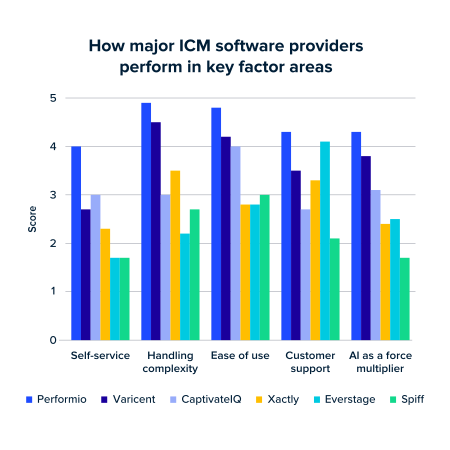
This comparison bar chart highlights how leading ICM vendors perform across the five most important value drivers: self-service, handling complexity, ease of use, customer support, and AI capabilities.
Finally, we took a weighted average of scores in each factor to reflect the level of priority we’d place on each one. (Weightings were informed by findings from our 2025 Incentive Compensation Trends report, the Forrester Wave, and our consultants’ experience.)
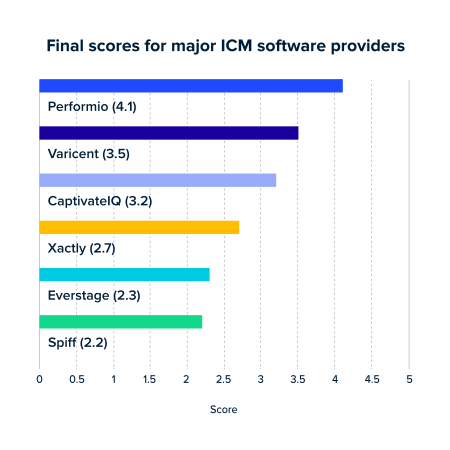
The weighted average scores put everything into perspective by prioritizing what matters most to buyers. You can see how this ranking works out here, but for now, let’s dig into those 12 vital factors and how the leading ICM brands deliver.
Part three: 12 critical criteria for evaluating ICM platforms
We’ve identified a set of 12 key factors that belong in every discussion about ICM solutions. These criteria are based on our own expertise and experience in the space, our 2025 Incentive Compensation Trends report, and trusted industry sources like the Forrester Wave.
Think of these factors as a starter set. They cover the essentials every organization should consider, but your final rubric may include additional criteria that reflect your unique goals, constraints, or industry needs. The most successful organizations take the time to define a clear set of criteria and use it consistently throughout the buying process.
In this section, we’ll walk through all 12 factors, explaining why they matter, how to evaluate them, and how major ICM vendors stack up.
- Technical skill required
- Safe testing & experimentation
- Custom reporting
- Out-of-box complexity support
- Common-sense workflows
- Data management & transformation
- Scalability
- Agility
- Onboarding momentum
- Customer support quality
- AI contextual maturity
- Agentic task execution
1. Technical skill required
Ideally, your staff’s expertise in incentive compensation management should be all they need in order to use your ICM software: they shouldn’t also have to be experts in programming languages, workflow and logic rules, or spreadsheet formulas. However, some ICM tools require users to have some degree of familiarity or expertise in these technical areas.
If you choose an ICM that requires additional technical skills, one of two things ends up happening:
- You’ll have to contact the vendor every time you need to adjust a plan—driving up costs and slowing down operations
- You’ll settle for a “good enough” setup that fails to properly incentivize reps and leaves revenue on the table.
In either case, the tool falls short of its potential.
It may be tempting to think, “Our comp manager knows how to code, so we’re okay.” But that creates a single point of failure. If that person leaves, you’ll not only have to replace them with someone who also has coding skills, but you’ll also burden the new hire with deciphering layers of custom code. Untangling those workarounds can be even harder than starting from scratch.
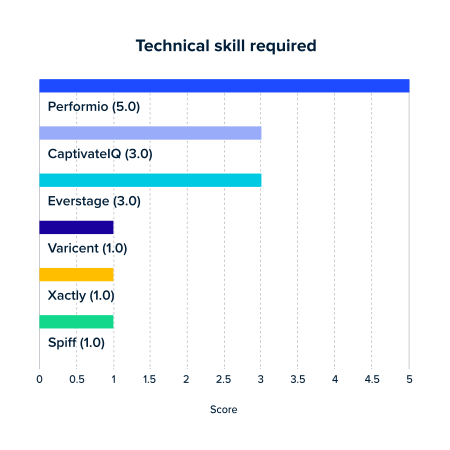
In our research, Performio ranks highest (5.0), offering the most user-friendly, low-code configuration experience. CaptivateIQ and Everstage score moderately (3.0), requiring some admin or technical involvement, while the rest typically demand more IT or developer support for implementation and changes.
Ideally, an ICM solution will require no previous experience in these areas at all—because the people managing your compensation management programs shouldn’t need to be proficient in these technical areas. Performio accomplishes this with a unique component-based system. These customizable and reusable modules provide unlimited flexibility without requiring specialized expertise.
2. Safe testing & experimentation
When making changes to your compensation plans, it’s important to do so without risking your existing setup. You also want visibility into how those changes will ripple across the organization. A good ICM solution lets you model scenarios in advance—testing how different incentives affect payouts, behavior, and overall costs—before anything goes live.
You should have access to a dedicated sandbox or testing environment where you can safely model and validate changes. And version control is just as important. The ability to track changes and roll them back means that even if a misstep reaches production, it can be reversed without compromising your system.
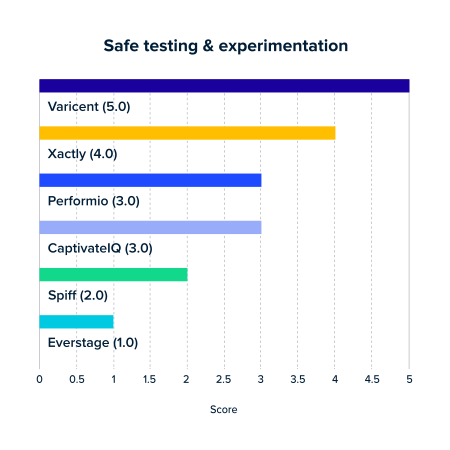
When it comes to safe testing and experimentation, vendor performance varies widely. Varicent leads the pack with a perfect 5.0 score, followed by Xactly at 4.0. This highlights how each ICM platform approaches testing reliability, with only a few vendors delivering enterprise-grade confidence.
Look for an ICM solution that combines a sandbox for experimentation with version control across both runtime and testing environments. Performio allows you to test new ideas, run simulations, make changes, and never risk disrupting day-to-day operations.
3. Custom reporting
Generating reports is essential for keeping incentive compensation on track and supporting broader organizational goals. Reports help admins verify payout accuracy, resolve disputes quickly, and monitor plan performance. And they give leadership the insights needed for forecasting, budgeting, and aligning incentive spend with business strategy.
Reporting should be intuitive and straightforward. But if every new report is a major lift, you’ll waste time and increase costs—or end up without the visibility you need.

"Strong ICM platforms simplify reporting by converting complex, normalized payment data into clear performance values. This empowers administrators to build custom reports without relying on technical skills or SQL for data transformation."Mark Kemp
Chief Customer Officer @ Performio
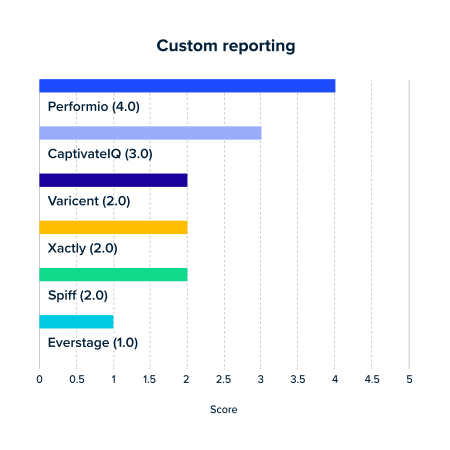
By our standards, nobody completely aces this category yet—not even us. Performio leads in custom reporting capabilities with a score of 4.0, and CaptivateIQ comes in second (3.0).
Your ICM platform should enable users to build and run reports directly in the tool, without needing to get over a steep learning curve first. Performio makes it easy to create custom reports and dashboards on demand with no technical expertise required.
4. Out-of-box complexity support
Compensation plans are inherently complex. They often involve SPIFs, custom hierarchies, multiple crediting models, frequent changes in the participation module, and ongoing rate management. If your ICM platform doesn’t support these components out of the box, you’ll be forced to rely on coding, formulas, or vendor intervention just to keep plans current. Or worse, you’ll end up simplifying your plans just to fit the system.
These mechanisms also need to be easy to adjust as business needs evolve. When market conditions shift, territories change, or new incentives are introduced, your admins should be able to make updates directly without waiting on vendor support.
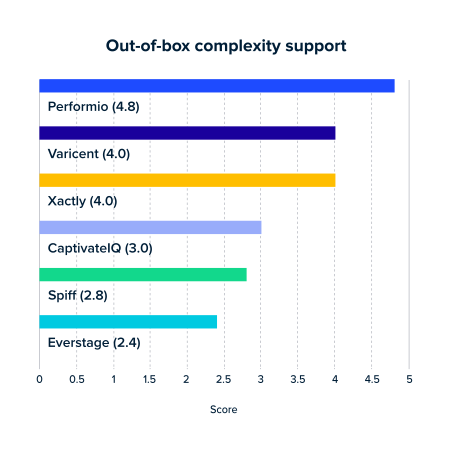
When it comes to how easily you can set and adjust plan components without extra coding, Performio clearly leads the pack with a score of 4.8. Varicent and Xactly also perform well at 4.0.
Look for an ICM solution that handles these common components natively and makes them easy to adjust directly in the tool. Performio empowers admins to manage complexity without sacrifice.
5. Common-sense workflows
Incentive comp involves managing a variety of different processes, and you shouldn’t have to move them all along by hand. Disputes need to be resolved, exceptions require approvals, and plan changes demand proper oversight. If workflows are too rigid or require technical expertise to configure, admins end up chasing people down across disjointed communication channels, slowing everything down and increasing the risk of errors.

"The best ICM systems let reps dispute at the transaction level, eliminating the endless back-and-forth with admins. Once resolved, the system automatically updates values, ensuring accuracy without extra manual work. This transparency saves time and builds trust between sales teams and the compensation process."Patrick McCarville
Solutions Engineer @ Performio
Workflows should be flexible, easy to set up, and able to handle real-world scenarios. That includes support for multi-level approvals, single-transaction dispute resolution, and conditional workflows that adapt based on approval status.
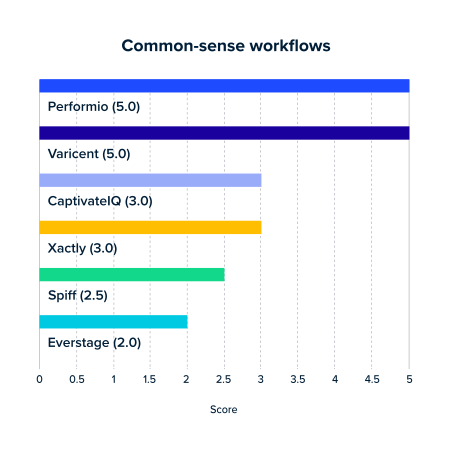
When it comes to automating workflows while still keeping critical human approvals in place, Performio and Varicent lead with perfect 5.0 scores.
The best ICM solutions, like Performio, streamline these processes while keeping human oversight in place where it matters, preserving accuracy and accountability.
6. Data management & transformation
Compensation plans are only as accurate as the data that feeds into them. Sales, finance, and HR teams rely on information flowing in from multiple systems, often in different formats and varying levels of quality. If your ICM solution requires extensive preconfiguration or technical expertise just to clean or import data, you’ll bottleneck your processes and increase the risk of error.

"The real challenge in incentive compensation isn’t running calculations—it’s managing the messy, inconsistent data that feeds them. A strong ICM platform should help teams clean, standardize, and transform that data automatically, freeing admins from endless manual prep and rework."Conor Frederick
Enterprise Account Executive @ Performio
A strong platform should handle that heavy lifting for you. That means supporting built-in ETL (extract, transform, load) capabilities, user-defined batch processing, and intuitive controls that let admins manage data without outside help.
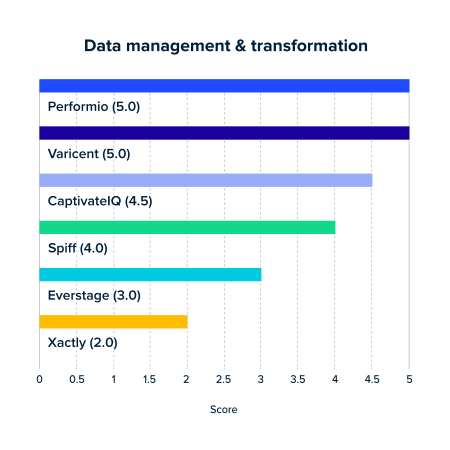
Data is often the hardest part of incentive compensation management—and only top solutions handle it well. Performio and Varicent both earn perfect 5.0 scores, with CaptivateIQ close behind at 4.5.
Look for an ICM solution that lets you work with your data as it is, without forcing heavy reformatting or constant vendor intervention. Performio provides robust, in-tool data management and transformation features.
7. Scalability
As your organization grows, your incentive compensation process needs to keep up. That includes onboarding new sales reps quickly, reorganizing territories, and adding new data sources as your tech stack expands. If your ICM solution can’t scale smoothly, you’ll end up buried in manual updates or stuck waiting on vendor support.

"As you evaluate an ICM solution, it’s important to look beyond what fits for go-live. The real measure is how it will serve you years down the road—when business plans shift, headcount grows, or new units are acquired. I’ve seen vendors that lacked the framework to scale with their customers, leaving teams stuck with complex, unmanageable systems after just a few years."Gwenaelle Wernert
Director of Professional Services @ Performio
The platform should automatically sync with systems like HRIS or Salesforce, adding new payees as they’re hired and reflecting changes in real time. It should also give admins in-tool control to add data points, customize integrations, and adjust territories—without leaning on professional services or external intervention.
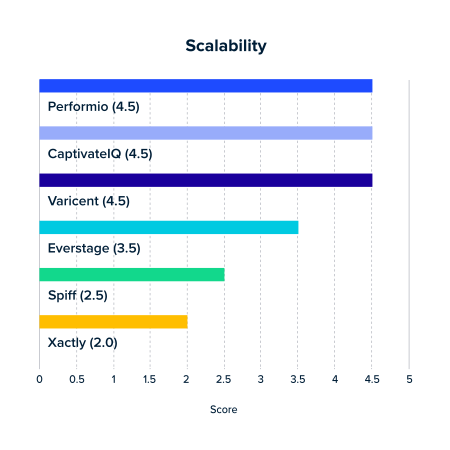
Scalability is critical as organizations grow and add new sales reps, territories, or data sources. Performio, Varicent, and CaptivateIQ all score strongly at 4.5, showing they can handle rapid growth and large deployments effectively.
Your ICM solution should scale with your business, not hold it back. Performio was built to grow alongside your organization.
8. Agility
Sales strategies and market conditions are constantly evolving, and your compensation plans must evolve with them. That might mean adding new crediting structures, introducing incentive mechanisms, or adjusting rates and rules mid-year. It also means preparing next year’s plan in advance—without disrupting the current one.
"The best ICM platforms combine flexible data management, customizable plan components, and AI-driven assistance. This lets administrators adjust complex logic quickly without technical support. Unlike systems with rigid formulas or opaque rules, strong platforms eliminate off-system calculations—especially valuable when mid-cycle changes leave little time for error."Mark Kemp
Chief Customer Officer @ Performio
The right platform should let admins build new plans, set future effective dates, and make mid-cycle adjustments directly in the tool. It should support a “build now, activate later” approach, allowing you to prepare changes that only go live when the timing is right. And none of this should require major system changes or vendor intervention.
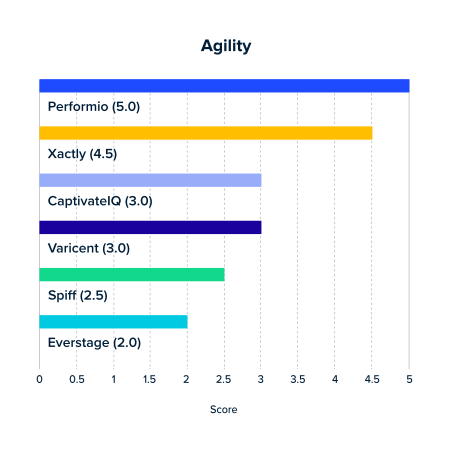
Agility determines how quickly and easily you can adapt commission plans mid-cycle without slowing down operations. Performio leads the pack here, enabling seamless modifications to even the most complex plans. Xactly also scores well at 4.5.
Plan changes should be fast, flexible, and safe to execute. Performio gives admins the agility to adapt quickly while ensuring accuracy and continuity across every cycle.
9. Onboarding momentum
An ICM solution only starts delivering value once it’s up and running. If implementation takes too long or leaves gaps in support, then you’re delaying your ROI.
High-quality onboarding should include clear timelines for implementation, a plan configured during onboarding, and bespoke training and documentation to set your team up for success. The vendor should also be equipped to handle enterprise-scale requirements, provide complementary break-fix consulting, and offer predictable costs via a fixed implementation fee.
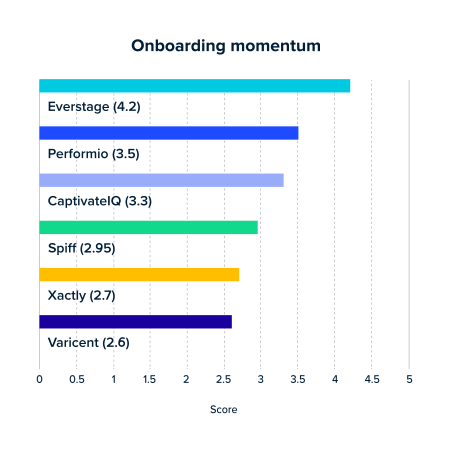
Onboarding momentum reflects how prepared your team will be to hit the ground running after implementation. No other ICM contender has invested in this area like Everstage. Performio follows with 3.5, slightly ahead of CaptivateIQ (3.3) and Varicent (3.2).
Look for a vendor that prioritizes timely and reliable onboarding. Performio ensures customers see value quickly and are well supported at every step.
10. Customer support quality
Admins will face questions, unexpected scenarios, or issues that can’t be solved with documentation alone. If your vendor’s support staff isn’t responsive or reliable, minor challenges can quickly turn into lengthy delays—which can damage both payout accuracy and employee sentiment.
Service level agreements (SLAs) are one of the clearest indicators of support quality. Pay attention to how a vendor defines severity levels and what their response times look like at each level. The best vendors treat time sensitivity as part of severity, not just whether the system is technically down. They also account for issues where workarounds exist but don’t scale, so you aren’t left with a “temporary” fix that creates more problems. And premium support should come with guaranteed resolution times, not just faster acknowledgment.
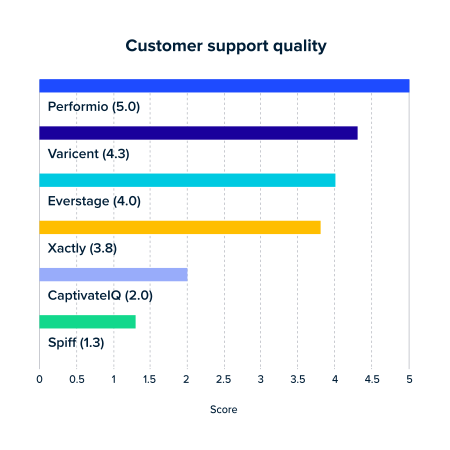
Customer support can make or break your ICM experience. Performio leads the pack with a perfect 5.0, showing consistently high-quality support. Varicent (4.3) and Xactly (3.8) solid customer service.
Look for a vendor with a proven record of responsive, effective customer support. (For what it’s worth, Performio was the only platform to receive a halo in customer feedback from the most recent Forrester Wave report.)
11. AI contextual maturity
A bolted-on chatbot isn’t enough. Artificial intelligence needs to access and understand your incentive compensation situation in order to provide any added value. Ideally, an ICM provider’s AI should be contextually aware of three different data sources:
- The ICM product itself. A mature AI system will understand how the product works. It understands the various types of entities, calculations, and processes that take place within the ICM, and can interpret relationships between them.
- Your own business. You’re bringing your own targets, hierarchies, territories, and language into the new ICM solution. The ICM’s AI should be able to understand how your business works and interpret the implications of this information.
- Your incentive compensation data. The data from your ERP, your CRM, your payroll system, etc.—ideally, your ICM’s AI will be able to reference, interpret, and explain all the data flowing into it.
Beyond all this, a truly mature AI system will not just understand these sources individually, but also infer relationships across all three.
Performio has heavily invested in AI contextual maturity, and we’ve been able to evolve very quickly. Most of our speed here is due to our unique component-based ICM architecture. Our system is built on an expansive library of tiny, specific calculation mechanics—which are far easier for artificial intelligence to read and understand than long workflow logic trees or interconnected spreadsheet formulas.
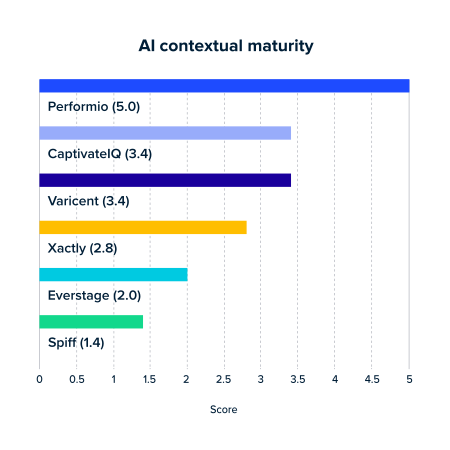
At the time of writing this guide, Performio leads the ICM pack in AI contextual maturity (5.0). Based on our research, we’re the only ICM whose AI system thoroughly understands all three sources and how they relate to each other. Varicent and CaptivateIQ are making strides (3.4) with AIs that understand both the ICM product and customer data—but they’ve got some ground to gain when it comes to understanding the customer business context.
12. Agentic task execution
This is where the AI rubber meets the incentive compensation road: how is the system using artificial intelligence to actually do the busywork for you?
Evaluating tools on this can be tricky. Ideally, you will come into the buying process with a list of tasks that you expect the tool’s AI to speed up for you—or handle altogether. On the other hand, a strong tool with a capable sales team will probably demo AI features you haven’t considered yet.
However, there are five tasks that notoriously eat up comp admin and payee time. You should investigate every ICM solution’s ability to speed up these processes with AI:
Plan generation. Every ICM customer will eventually need to generate the next incentive compensation plan. Some AI-powered ICMs simply give admins a set of step-by-step instructions for doing this, while more advanced systems can generate the plans automatically from natural-language prompts.
Plan modeling. This is the process of running “what if?” scenarios. Basic tools will run simple calculations based on natural-language prompts (“How much commission am I on track to earn this quarter?” or “Should we expect to hit our stretch sales goal this year?”). But more advanced tools can interpret questions that include assumptions, such as “How will it impact sales if we bring on five sales interns this summer instead of two?” Some tools are even capable of suggesting plan optimization tactics or answering questions like, “How should we change our commission plan to ensure we hit this quarter’s goals?”
Plan analysis. In the near future, admins should expect their ICM’s AI to detect anomalies and incentive conflicts, send alerts, and implement fixes. Based on our research, none of the major ICM providers are here yet—but it’s smart to ask what plan analysis capabilities are on their product roadmap.
Data processing. Incentive compensation admins oversee the movement of data from various systems into the ICM. This is the kind of work AI was made for. More rudimentary ICM tools will use AI to explain data tables and provide admins with guidance for moving data around. Advanced solutions will go the extra mile, detecting anomalies, suggesting fixes, and creating tables and importers from natural-language commands.
Dispute management. AI is complicating the world of payout disputes—your ICM should help you mitigate this. At the very least, an ICM should use AI to describe payout calculations, answering questions like, “I expected to earn $3,400 in commission for the XYZ deal—why did I only get $2,700?” More powerful ICM AI agents will implement resolutions, gather the proper approvals, and suggest plan changes to mitigate future disputes.
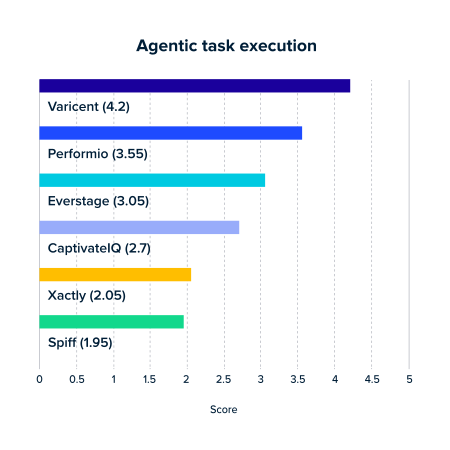
Varicent scored highest in terms of agentic task execution (4.2), with Performio next in line (3.55). Varicent’s AI capabilities in plan modeling and data processing lead the way—while Performio has the edge on them in AI-powered dispute management.
Bonus: Enterprise readiness
Not every organization will need enterprise-grade capabilities right away, but for large or fast-growing companies, they’re non-negotiable. High-volume data loads, complex approval structures, and global operations demand a platform that can scale without sacrificing speed or reliability. If an ICM solution isn’t built for enterprise use, you’ll eventually hit a ceiling.
Enterprise readiness includes role-based access control to protect sensitive data, the ability to quickly process billions of records, robust workflow automation, native ETL and APIs for seamless integration, multi-currency support, and compliance with standards like SOC II. It also means having enterprise-grade support available 24/7 and a proven record of success with recognizable enterprise customers.
Look for an ICM solution that demonstrates proven enterprise readiness, backed by technical performance, security certifications, and a track record with large-scale customers. Performio delivers enterprise-grade capabilities—whether you’ll need them now or tomorrow.
See Performio in action
Selecting the right ICM solution is one of the most important technology decisions your organization will make. The stakes are high, but with the right process and a clear-eyed comparison, you can cut through the noise and find a platform that truly meets your needs.
With Performio, you don’t have to choose between ease of use and flexibility. Our component-based ICM platform lets you intuitively manage even the most complex plans, with built-in data management tools, powerful reporting, and workflows that scale with you.
-

Streamline your compensation process today with Performio
Stop wasting time on errors and manual work. Book a demo and simplify commissions.
Appendix: The 2026 Performio ICM scoring methodology
Want a closer look at how we developed those scores? Here’s the process we used for grading ourselves and four other major ICM providers. Feel free to use all or part of this rubric yourself, or use it as inspiration to build your own.
Grading ICM software on technical skill required
This grading scale looks at three aspects of an ICM tool’s self-service capabilities, namely, the level of proficiency users need in any of the following areas in order to make use of the tool:
- Programming languages
- Workflow logic rules
- Spreadsheet formulas
To grade these tools, we start with a perfect base score of 5 and apply penalties based on the level of proficiency required in these areas. We use four proficiency levels:
- Expert: Requires skills that one would expect to gain after more than one year of dedicated practice
- Intermediate: Requires skills that one would expect to gain after 3–12 months of dedicated practice
- Beginner: Requires skills that one would expect to gain within 3 months of dedicated practice
- None: Requires no skill or practice
To calculate a final score, we subtract the single highest penalty that a tool earned from a perfect 5. Only tools that require no expertise in any area receive a perfect score, and only tools that require expert-level skill in programming languages receive a score of 1.
|
Scoring ICM software on technical skills required |
|
|
Score |
Score implications |
|
5 |
Requires no skill in programming languages, workflow logic, or spreadsheet formulas |
|
4 |
Requires beginner-level skill in spreadsheet formulas AND/OR workflow logic |
|
3 |
Requires EITHER:
OR:
|
|
2 |
Requires EITHER:
OR:
|
|
1 |
Requires expert-level skill in programming languages |
Scoring ICM software on safe testing & experimentation
To grade a platform’s ability to support testing, we look at two capabilities of the software:
- Its ability to support a sandbox testing environment
- The extent of version control it supports
We begin with a perfect score of 5 and apply penalties based on these two vectors.
The first vector assesses whether users could experiment in one, multiple, or zero sandbox environments, and assumes being able to test multiple sandboxes simultaneously is better than only having a single test environment.
Similarly, the second vector applies points based on whether the tool includes version control (the ability to track and revert to past iterations of compensation plans). Tools that include version control for both the live plan and testing environments received no penalties in this area.
|
Scoring ICM software on safe testing & experimentation |
|
|
Score |
Score implications |
|
5 |
Supports multiple testing environments AND version control in both runtime and testing. |
|
4 |
EITHER:
OR:
|
|
3 |
EITHER:
OR:
|
|
2 |
EITHER:
OR:
|
|
1 |
No testing environment AND no version control |
Scoring ICM software on custom reporting
This grading scale examines whether or not the ICM software gives users the ability to build in-tool custom reports, and the requisite technical skills required to build and run custom reports.
The first aspect of this scale is binary: if an ICM doesn’t support in-tool custom report builds, it receives the lowest score of 1. If it does support custom reports, penalties are applied to a perfect score of 5 depending on the level of technical expertise a user needs in order to build and run those reports:
- Expert: Requires skills that one would expect to gain after more than one year of dedicated practice
- Intermediate: Requires skills that one would expect to gain after 3–12 months of dedicated practice
- Beginner: Requires skills that one would expect to gain within 3 months of dedicated practice
- None: Requires no skill or practice
|
Scoring ICM software on custom reporting |
|
|
Score |
Score implications |
|
5 |
Supports in-tool custom reports that require no technical skill to build and run |
|
4 |
Supports in-tool custom reports that require beginner-level technical skill to build and run |
|
3 |
Supports in-tool custom reports that require intermediate-level technical skill to build and run |
|
2 |
Supports in-tool custom reports that require expert-level technical skill to build and run |
|
1 |
Does not support in-tool custom reporting |
Scoring ICM software on out-of-box complexity support
This grading scale focuses on five plan mechanisms where ICM platforms tend to struggle when it comes to managing complexity:
- SPIFs
- Custom hierarchies
- Multiple concurrent crediting models
- Making changes in the participation module
- Rate management
For each of these problem areas, we ask two binary questions:
- Does the tool support this plan mechanism out of the box, without additional coding, logic construction, formula writing, or vendor support?
- Does the tool include functionality that makes it easy to adjust this mechanism?
This grading scale begins with a base score of 1, and then applies bonuses based on the answers above when applied to all five plan mechanisms:
- +0.6 for each plan mechanism supported out of the box
- +0.2 for each plan mechanism that was easy to adjust
All in all, basic out-of-box support accounts for 3 possible points total, while easy adjustments account for 1 possible point total.
Scoring ICM software on common-sense workflows
Automation should reduce busy-work as much as possible, while creating as few new headaches as possible. To grade ICM platforms on this, we examine each platform against four binary, true/false statements:
- The tool doesn’t require any technical expertise to write workflows.
- The tool supports multi-level approval workflows.
- The tool supports single-transaction dispute workflows.
- The tool supports conditional workflows based on approval status.
The grading scale begins with a base score of 1, adding an additional point for every statement that is true about the tool being graded.
|
Scoring ICM software on common-sense workflows |
|
|
Score |
Score implications |
|
5 |
All of the following statements are true:
|
|
4 |
Three of the statements listed in tier 5 are true. |
|
3 |
Two of the statements listed in tier 5 are true. |
|
2 |
One of the statements listed in tier 5 is true. |
|
1 |
All of the statements listed in tier 5 are false. |
Scoring ICM software on data management & transformation
Similar to the grading scale above, this scale begins with a base score of 1, and adds additional points based on whether the following statements are true of the product:
- The tool does NOT require data to be preconfigured before import.
- The tool does NOT require technical expertise to manage and transform data.
- The tool has built-in ETL capabilities.
- The tool supports user-defined granular batch data processing.
ICM platforms receive perfect scores of 5 if all the above statements are true.
|
Scoring ICM software on data management & transformation |
|
|
Score |
Score implications |
|
5 |
All of the following statements are true:
|
|
4 |
Three of the statements listed in tier 5 are true. |
|
3 |
Two of the statements listed in tier 5 are true. |
|
2 |
One of the statements listed in tier 5 is true. |
|
1 |
All of the statements listed in tier 5 are false. |
Scoring ICM software on scalability
To grade ICM tools on their ability to accommodate rapid growth, we began with a base score of 1 and applied additional points based on the tool’s capabilities in the areas of:
- Adding new data points
- Reorganizing territories
- Adding new payees
- Managing the Salesforce data connector
Each of these areas accounts for a potential additional point for a total perfect score of 5.
The first two areas (adding new data points and reorganizing territories) are graded binarily, with the combined potential of adding 2 points to the grade:
- Supported in-tool (+1): The user can perform the action using the tool’s interface.
- Not supported in-tool (+0): Performing the action requires reaching out to the vendor for support.
In terms of adding new payees to the plan, tools were awarded additional points depending on how much the tool’s automation capabilities support the task, with the potential to add 1 additional point to the grade:
- Fully automated (+1): The ICM tool automatically imports from / syncs with other systems (e.g., HRIS, Salesforce) to populate changes.
- Blended (+0.5): This action is partially supported by automation, but still requires manual input (e.g., new payees may be synced from HRIS, but users need to manually add them to the comp plan in the ICM tool).
- Fully manual (+0): This action requires the user to manually input new payees. There is no automation capability for importing/syncing new payees with outside systems.
To grade tools on how they handle managing the Salesforce connector, a potential or partial point could be awarded based on how dependent on vendor professional services users are:
- Fully self-serviceable (+1): The user can fully customize the Salesforce connector using the ICM tool interface.
- Blended (+0.5): Some elements of managing the Salesforce connector can be performed by the user, but others require the user to work with the vendor's professional services team.
- Professional service–dependent (+0): Managing the Salesforce connector requires the user to work with the vendor's professional services team.
|
Scoring ICM software on scalability |
|||
|
Scoring area |
Scoring options |
Scoring option bonus |
Potential points |
|
Adding new data points |
Supported in-tool |
1 |
1 |
|
Not supported in-tool |
0 |
||
|
Reorganizing territories |
Supported in-tool |
1 |
1 |
|
Not supported in-tool |
0 |
||
|
Adding new payees |
Fully automated |
1 |
1 |
|
Blended |
0.5 |
||
|
Fully manual |
0 |
||
|
Managing Salesforce data connector |
Fully self-serviceable |
1 |
1 |
|
Blended |
0.5 |
||
|
Professional service–dependent |
0 |
||
Scoring ICM software on agility
To grade tools on their ability to accommodate rapid plan modification, we examine a tool’s ability to handle two key tasks:
- Building the next period’s incentive compensation plan before the effective date
- Adjusting the current plan (e.g., applying new crediting structures, plan mechanisms, rates, rules, etc.)
The grading scale assumes a base score of 1, with the potential to score 2 additional points per task. For each task, we grade a given tool against three true/false statements and apply additional points accordingly:
- Performing the task requires making significant changes to the platform.
- If FALSE: +1
- If TRUE: +0
- Users can perform this task on their own using the ICM interface.
- If TRUE: +0.5
- If FALSE: +0
- Users can perform the action without altering the current plan and activate changes later.
- If TRUE: +0.5
- If FALSE: +0
Perfect scores of 5 are awarded to tools that allow users to perform both tasks using the ICM interface, without making major changes to the platform or needing to push them live immediately.
Scoring ICM software on onboarding momentum
Every implementation and onboarding experience is unique, and you can’t know for sure what yours will be until you’re already going through it. However, there are pre-decision indicators that your setup process will be successful.
To grade products on their ability to set customers up for success, we assume a base score of 1, and apply bonuses in three areas:
- 2 potential points evenly distributed across a set of five binary early indicators
- 1 potential point for implementation time (as indicated by G2 reviews)
- 1 potential point for time to value (as indicated by G2 reviews)
A perfect score of 5 goes to products for which all binary indicators are TRUE, and for which both implementation time and time to value are “Very fast” (at least one standard deviation faster than the mean).
Scoring ICM software on customer support quality
Similar to onboarding momentum, there’s no objective way to predict what your exact experience will be with a given vendor’s support team. However, a company’s service level agreement (SLA) and third-party analyst reports can give a decent picture of what to expect.
To grade ICM products on quality of customer support, we award points in five areas:
- Speed of response time per priority level promised in SLA
- Time-sensitivity acknowledgment for level 2 service requests in SLA
- Inclusion of problems with non-scaling workarounds in level 2 service requests in SLA
- Resolution time guarantees for premium support customers in SLA
- Halos in customer feedback awarded by Forrester Wave’s review of ICM vendors in 2025
Our grading scale is set so that an ICM platform receives a score of 3 if their SLA promises at an average response time across all four priority levels for service requests. From there, a tool may receive the following bonuses:
|
Scoring ICM software on customer support quality |
|
|
Bonus criteria |
Bonus awarded |
|
Vendor’s SLA promises exceptionally fast response time for a given service request priority level (can be applied to up to four service levels) |
+0.25 |
|
Vendor’s SLA defines time-sensitivity criteria to escalate a service request to priority level 2 |
+0.25 |
|
Vendor’s SLA qualifies issues with known non-scaling workarounds in priority level 2 |
+0.25 |
|
Vendor’s SLA includes guaranteed resolution times for customers paying for premium support |
+0.5 |
|
Vendor received a halo from the 2025 Forrester Wave report for exceptional customer feedback |
+1 |
Scoring ICM software on AI contextual maturity
We graded contextual maturity on four weighted vectors.
First, we graded each ICM tool on its system’s level of awareness of the ICM product itself, the customer’s business needs, and the customer’s ICM data. Every ICM tool received a score in each of these domains accordingly:
- Unaware (0): AI cannot access the domain.
- Aware (2): AI can fetch and reference data and information from the domain.
- Understands (4): AI can interpret implications of what it accesses in the domain.
Then we looked at each tool’s cross-contextual maturity, that is, its AI’s ability to unify and interpret relationships between information across all three domains. This also had three potential grades:
- Siloed (0): AI cannot understand relationships between context areas
- Partially unified (2): AI can identify & interpret relationships between 2/3 context areas
- Unified (4): AI can identify & interpret relationships between all 3 context areas
These scores were then weighted and added to a base score of 1.
| Scoring ICM software on AI contextual maturity (Bonuses are added to a base score of 1) |
|||
|---|---|---|---|
| Scoring area (weight) |
Scoring options | Scoring option bonus | Potential weighted bonus |
| ICM product contextual maturity 20% | Unaware | 0 | 0.8 |
| Aware | 2 | ||
| Understands | 4 | ||
| Tenant business contextual maturity 30% | Unaware | 0 | 1.2 |
| Aware | 2 | ||
| Understands | 4 | ||
| Tenant data contextual maturity 30% | Unaware | 0 | 1.2 |
| Aware | 2 | ||
| Understands | 4 | ||
| Cross-contextual maturity 20% | Siloed | 0 | 0.8 |
| Partially unified | 2 | ||
| Unified | 4 | ||
Scoring ICM software on agentic task execution capabilities
We assigned a weighted grade to ICM providers based on their AI’s capabilities to expedite and perform five key types of work: plan generation, plan modeling, plan analysis, data processing, and dispute management.
| Key task areas for ICM AI to perform, weighted | |
|---|---|
| Task area | Score weight |
| Plan generation | 25% |
| Plan modeling | 25% |
| Plan analysis | 15% |
| Data processing | 25% |
| Dispute management | 10% |
For plan generation, ICM providers were graded on the following scale:
- Remedial (0): At best, AI generates copies of current plan for manual adjustment
- Advises (2): AI generates tasks and instructions for plan creation
- Iterates (3): AI copies & modifies extant plan(s) via natural-language prompts
- Generates (4): Previous levels + AI creates nascent plans from natural language
The plan modeling grading scale was slightly more complex:
- Remedial (0): At best, AI performs simple what-if calculations
- Simple forecasting (1): AI performs natural language ML projections (trendlines, regression analysis, etc.)
- Scenario modeling (2): AI calculates outcomes based on natural-language assumptions
- Semi-advanced (3): Performs previous, plus EITHER problem-solving (suggests actions to realize user-input outcomes) OR opportunity-seeking (proactively suggests and opportunities to improve)
- Advanced (4): AI performs projections, scenario modeling, BOTH problem-solving AND opportunity-seeking
The plan analysis scale similarly graded ICM providers on how much action their AI agents could take on behalf of admins:
- Remedial (0): At best, AI explains how plans work
- Trend-aware (1): AI automatically detects anomalies, sends alerts
- Implication-aware (2): Previous level + AI detects drifts from targets early, sends alerts
- Advises (3): Previous levels + AI detects risks, incentive conflicts, opportunities, etc., recommends actions
- Takes action (4): Previous levels + AI implements fixes/opportunities
Data processing capabilities were evaluated based on how helpful the ICM’s AI system is in performing data extraction, loading, and transformation (ELT):
- Remedial (0): Vendor does NOT leverage AI for ELT
- Explains (1): AI recognizes data types, can describe tables to admins
- Advises (2): Previous level + AI gives admins steps to follow in order to move data in and out of ICM
- Validates data (3): Previous levels + AI recognizes data anomalies across the entire ELT flow, suggests fixes
- Takes action (4): Previous levels + AI creates tables and importers from natural-language prompts
Finally, ICMs were graded on their AI’s dispute management capabilities:
- Remedial (0): At best, AI opens dispute tickets from chatbot, chatbot information serves as preventive dispute management, etc.
- Explains (1): AI recognizes dispute data, describes status & calculations
- Advises (2): AI suggests responses & action items for both parties
- Takes action (3): AI implements resolutions into payouts, collects approvals, etc.
- Makes recommendations (4): Previous levels + AI suggests plan changes to mitigate future disputes
These subscores were weighted and then added to a base score of 1.
| Scoring ICM software on agentic task execution (Bonuses are added to a base score of 1) |
|||
|---|---|---|---|
| Scoring area (weight) |
Scoring options | Scoring option bonus | Potential weighted bonus |
| Plan generation 25% | Remedial | 0 | 1 |
| Advises | 2 | ||
| Iterates | 3 | ||
| Generates | 4 | ||
| Plan modeling 25% | Remedial | 0 | 1 |
| Simple forecasting | 1 | ||
| Scenario modeling | 2 | ||
| Semi-advanced | 3 | ||
| Advanced | 4 | ||
| Plan analysis 15% | Remedial | 0 | 0.6 |
| Trend-aware | 1 | ||
| Implication-aware | 2 | ||
| Advises | 3 | ||
| Takes action | 4 | ||
| Data processing 25% | Remedial | 0 | 1 |
| Explains | 1 | ||
| Advises | 2 | ||
| Validates | 3 | ||
| Takes action | 4 | ||
| Dispute management 10% | Remedial | 0 | 0.4 |
| Explains | 1 | ||
| Advises | 2 | ||
| Takes action | 3 | ||
| Makes recommendations | 4 | ||
Related Topics